


Three dimensional printer allows to prototype, replacement components, models, decorations tools and custom products. However, most of the work that goes into a successful 3D printing project is done well before the printer starts running. As a prerequisite, you need at least some accurate digital information about the object and then requires it to be conveyed in a file format compatible with your printing software. That is why you need a compact object 3D scanner and in addition to that different types of files to print with a 3D printer.
What is a Small Object 3D Scanner?
A small object 3d scanner is a type of apparatus that can be designed to scan the shape and surface details of relatively tiny physical objects. The scanner gathers information from the surface of objects instead of taking measurements for every curve and edge. This data may include shape, dimensions, texture, and sometimes color depending on the scanner.
In objects like small figurines, mechanical components, jewelry-sized items, toys and decorative pieces, model parts for engineering work or product samples — a small scanner is ideal. The biggest advantage is fast and easy. Instead of starting completely from scratch build a model, you can first capture an existing object and take that data as the base.
Preparing an Object Before Scanning
Before you jump to conclusions about whether the recent scan will be the end of it, seriously consider preparation even if this can have an overwhelming influence on scan precision. Your object itself should be wiped down; avoid dust, loose pieces or anything that can move while being scanned. You must also place it so the scanner can access as much of the surface as possible.
Optical scanners can have problems with dark, shiny, transparent or highly reflective objects. Scanning conditions can also be altered in those cases as needed. You can save time later on and make existing models less hard to process by creating the object in a more prepared way.
Capturing Multiple Angles
With a scan, it is uncommon to capture all of the elements of a small object. Hidden regions become holes or incomplete areas of the digital model. Taking additional angles with the object rotated creates a better representation as well.
Cleaning the Scanned Model
Not all raw scan data is ready for consumption directly. It may introduce additional unwanted points from the table, background, stand or nearby objects. This additional information is typically filtered out by software to leave just the object we want. After cleaning, the scan might require hole filling, smoothing, alignment or optimization of the mesh.
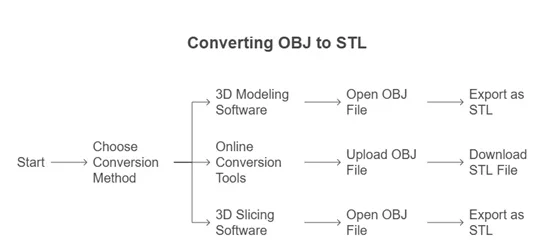
Turn Scan Data into an STL File
After the scanning has finished, the digital model must be adapted for the production process. The file can become quite heavy as a scan may consist of millions of points or very dense mesh. Carefully reducing the mesh reduces edit and processing difficulty.
Check the model for holes, reversed surfaces, non-manifold areas and other geometry problems as well. This model, once corrected, will be exported in the way you want into slicing software to 3d print.
Modernizing the 3D Printing Workflow
3MF was designed with advanced 3D printing workflows in mind. It can hold the model geometry along with ancillary information that is potentially useful during printing. It can give you a more comprehensive solution to transfer a project between compatible applications compared with older formats.
The development of 3MF is growing in importance as the software for 3D printing matures. This is especially valuable for projects with multiple themes, materials, colors or where the printer settings are easily adjusted via the software being used.
Combining Scanning and 3D Printing
The beauty comes when scanning works seamlessly with the printing. A small object 3d scanner can take an existing object and create a digital version of it, but the 3D printer takes that digital version – exported as an STL file for example – and produces it or altered it. It comes in handy when one need replacement parts, prototypes, model for education purposes, custom designs or reverse engineering projects.
Let us consider, for example, that a small plastic element is no longer produced. This includes scanning the original component, cleaning the resulting mesh, making required modifications to design, exporting via an adequate format, and finally helping with printing it. That saves a ton of design time.
Final Thoughts
The small object 3d scanner converts an item in the real world into a practical digital model and then, with the right 3d printer file types, enables that model to pass through all phases of editing and manufacturing. Collectively, they simplify reproduction of objects, prototyping, preservation of physical designs and development of custom products. The basic steps here are all you need to really get going with scanned 3D models.
FAQs
So what exactly does a small object 3d printer mean?
A small object 3d printer is a particular application of a 3d scanner that captures the shape & details of small physical objects in order to create a digital model file for a 3d printing process with the help of some special software.
What does 3D printer file types mean?
There are various 3d printer file types that store 3D geometry, textures, materials or project information or even printer instructions. The best answer also depends on the state of the workflow.
Is STL better than OBJ?
Neither is automatically better. STL is very trivial and has a lot of support while OBJ supports some extra data like textures. The choice should be made based on your software and project requirements.
Also Read
